July is Disability Pride Month!

Flyer with headline 'Anti-Prime Days Fundraiser'. In the middle left, a thermometer with a goal of $500 in recurring monthly donations. In the middle, the We All We Got logo and a QR code linking to the donate page. In the middle right, another thermometer with a goal of $1500 one-time donations, currently filled to about $270. At the bottom 'Let's unite to support community instead of billionaires!'

Hey San Diego, We All We Got is running a fundraiser to help sustain the free grocery distribution and deliveries. Can you spare some money to support the community instead of billionaires? Every dollar helps!

weallwegotsd.com/donate


A Handful of Good Things

During Homebrew Website Club tonight, Joe reminded us of this quote as an attempt to end on a positive note:

“What do we got on the spacecraft that’s good?” — Apollo 13

My motivation to write has been in a slump but there have been some good things recently, so it was a good nudge to document them.

On Memorial Day weekend, I started taking walks around Golden Hill park. I did not set out with a plan to make it a daily thing, but I have kept at it. I usually go in the evening right before sunset. The sun and the cooler temperatures feels perfect and I find it a good way to reset my mind after the day. I hope to keep it a regular habit but am not putting pressure on myself.

There have been a few events with the local Covid-cautious community: a retro video game night, a meetup at Chollas Lake Park, and a birthday party. It’s been a nice change of pace from being a relative hermit earlier this year.

I attended the Art in the Park meetup and met a few new people. It was a perfect big tree in the park to hang out under and the people were great. I will be back.


It’s been a minute since I’ve listened to older Viva Voce, but I was reminded how great that first album is. Tracks: “Shining in My Shoes” and appropriately, “June.”


I was following James’ Search engine shortcuts in Firefox which was very helpful, though I was not seeing this part of step 5 in Firefox on Windows:

“Click the icon of the site in the ‘This time, search with:’ bar. If you haven’t already added the site as a search engine, a small green + icon should appear indicating you can add the site as a search engine.”

I knew that indieweb.org advertised OpenSearch, so I thought there should be a way the browser picks up on that. I found that right-clicking in the address bar gave me the option Add “IndieWeb (en)”.

screenshot of right-click menu with the option to add 'IndieWeb (en)'

That worked and the search now shows up under Settings > Search Shortcuts. However, it appears that the edit option is disabled, which seems like it might be a bug. That prevents me from adding a search shortcut like @iw unless I manually add the search engine.


Gripe: I'm so tired of badly behaved bots making the web that much shittier these days.


I'm glad Game Changer is back. I laughed so hard at the first two episodes.


Phishing email impersonating Capital One sent from OnlineAlerts--[yourname]@email.cz

Watch out for an email like this about Capital One, or any other financial site. If your account is locked, no reputable company should send you a link to enter your login information.

From my experience, real Capital One messages come from capitalone@notification.capitalone.com

To report suspicious emails to Capital One, visit capitalone.com/help-center/fraud-disputes/report-suspicious-email/. After filling out their form, forward the scam email you received to abuse@capitalone.com.

We've locked your online access.

Hi [name],

For your security, we've locked your online access due to too many unsuccessful sign-in attempts.

To sign in, you'll need to find and sign in with your existing username and password and need to reset your password after signing in.

Unlock Online Access [phishing link redacted]

  1. iOS
  2. Sign in to the Capital One Mobile app on your mobile device.
  3. Tap your profile photo.
  4. Select Security then mobile app verification.
  5. Tap the toggle switch next to mobile app verification to turn this feature on.
  1. Android
  2. Sign in to the Capital One Mobile app on your mobile device.
  3. Tap your profile photo.
  4. Select Security then Manage My Devices.
  5. Tap the toggle switch next to the name of the device you’re currently using.

Your safety and security are important to us. Thank you for choosing Capital One.

This one was sneaky because those numbered lists after the link seem like legitimate steps. I have never used their mobile app, but my suspicion is those steps would sign you out of the app. If you clicked the link and entered your login information, the attacker has it and could change it. Getting you to sign out of the app ensures you don't have any access at that point.

They also did a good job of including Capital One's boilerplate at the bottom of the message, including the legitimate From email and links to their Privacy Policy, Help, and Contact. The links used the click-notification.capitalone.com domain. I confirmed that matches real messages from Capital One.

To ensure delivery, add capitalone@notification.capitalone.com to your address book.

This email was sent to [email] and contains information directly related to your account with us, other services to which you have subscribed, and/or any application you may have submitted.

Capital One does not provide, endorse or guarantee any third-party product, service, information or recommendation listed above. The third parties listed are not affiliated with Capital One and are solely responsible for their products and services. All trademarks are the property of their respective owners.

Please do not reply to this message, as this email inbox is not monitored. To contact us, visit www.capitalone.com/help-center/contact-us.

Aside: I actually closed my Capital One account a couple months ago. They warned that eventually my online access might be turned off and they would send tax documents in the mail. At first glance, I thought that's what this message was, but realized my account was under a different email, plus @email.cz is phishy as hell.


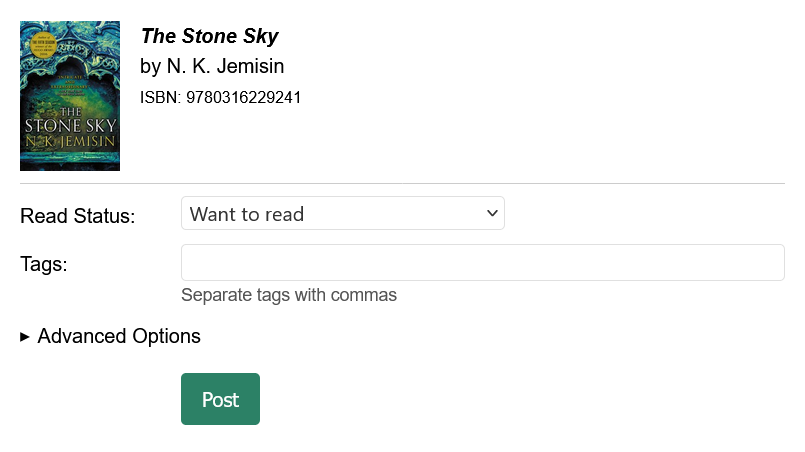
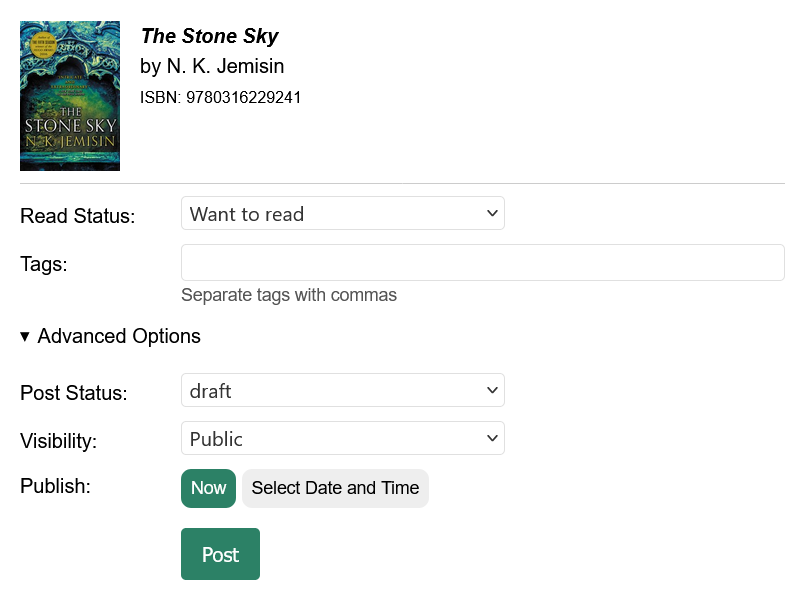
I’m working on a new search feature in indiebookclub which uses Open Library and supports cover images. It has me tinkering with the UI of the posting form and I’m interested in feedback about this first pass.

My first thought was to display the selected book information in a more compact, read-only block at the top of the form so you only have to select the status (want to read, currently reading, finished reading), then optionally add tags and other choices if you are using Micropub.

However, I still want to give people the option to update the book information before they post, so I was considering a button that would change the book information into editable fields. I experimented with various options and did not come up with anything I loved. I am now leaning towards always showing the fields with the populated values. Keep it simple.

screenshot of new posting UI that has fields: read status, title, by, ISBN, tags, status, visibility, published date, and timezone offset; all displayed in a horizontal layout on a larger screen

Screenshot 1: on larger screens

screenshot of new posting UI with the same fields described above; all displayed in a vertical layout on a smaller screen

Screenshot 2: on smaller screens

I did make the form more compact overall: less padding inside the form fields, less vertical space between them, and a horizontal layout on larger screens (using this WCAG technique). I also moved the timezone offset field out of a collapsed details element.

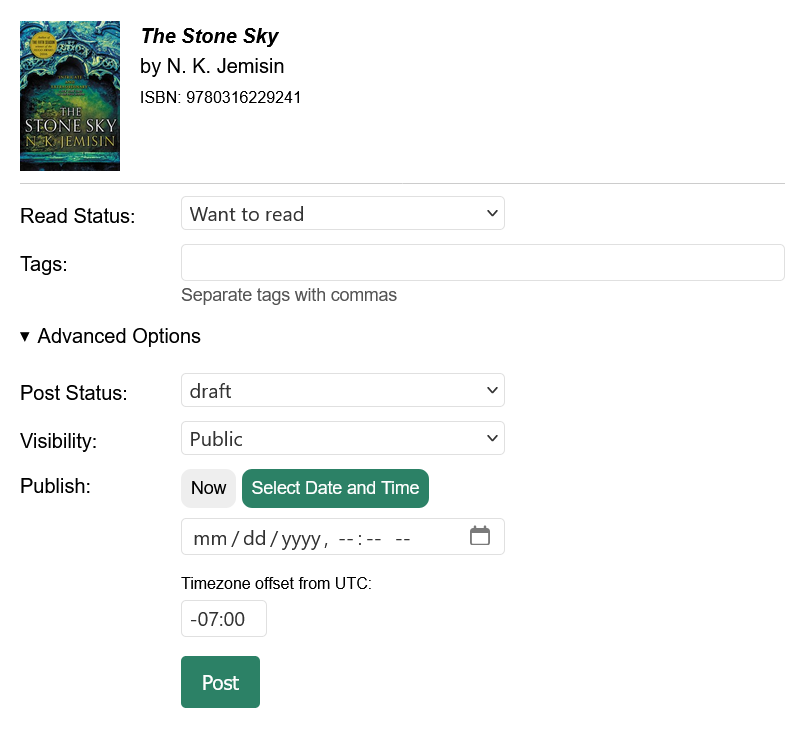
For comparison, below is a screenshot of the form as it exists. There are still a few parts of it that need to be put into my mockups, like choosing ISBN or DOI.

screenshot of current posting UI with the same fields described above

Screenshot 3: the posting form as it appears currently, for comparison

There will still be an option to use this form without searching Open Library, so if you are using a bookmarklet or prefer to type in all the fields, that will continue to work.

I look forward to any feedback or questions!


Selfie with my mustache and beard
Selfie with my new clean shaved face

It’s the end of an hair-a.

I started growing the facial hair in April 2020 because, hey, why not? I had no idea if I would keep it for long, but fast forward six years and I guess I liked it. I still like it today, but I thought it was time for a change, especially with summer coming.


The Kids are Alright

I recommend listening to this performance while reading on:

UGA Wind Ensemble: A Mother of A Revolution! - Omar Thomas

The Watertown, Wisconsin school board voted to remove this song, “A Mother of a Revolution!”, from the spring concert. Why? Because the song was dedicated to Marsha P. Johnson, an important figure in the LGBTQ+ rights movement. And according to most of the board members’ bigotry, that must make it “indoctrination and radical curriculum.” 🙄

As TMJ4 News reports, the band director properly followed the board policy back in October, notifying families of the potentially controversial song and gave students the option to opt out. Only a few did.

Fast forward several months, and the board votes to remove the song just a week before the spring concert.

Students and family members spoke out at the board meeting:

“It is a band piece with no lyrics that is very technically challenging,” said Anderson. “We have worked so hard for months.”

“I don't think you guys understand how hard it is to listen to you guys not accepting,” one student told the board. “I know what it’s like to not be accepted.”

Students at the school and the middle school also staged walkouts. Good for them! I really hope the band will play the song anyway (surprise encore?) on May 18th.

Updates

A local church is hosting a community performance of the song by the school band and the composer, Omar Thomas, will be conducting! Wednesday, May 20, 2026 at 7:00PM Central. There will be a livestream as well: watertownimmanuel.org/concert

Watch:

Watertown, WI community members perform 'A Mother of a Revolution' following school ban


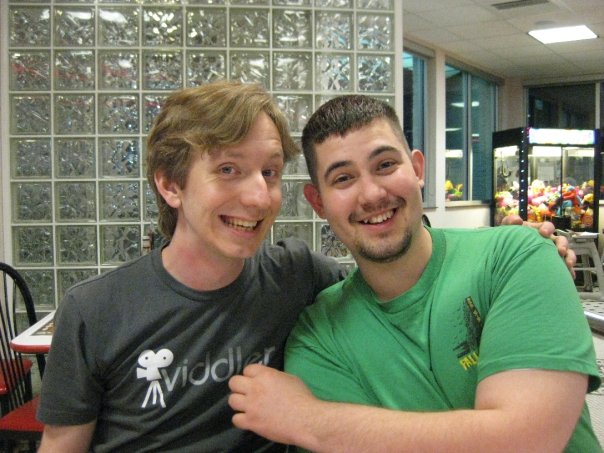
Me cheesing on the left, wearing a gray Viddler shirt, and Jon on the right wearing a green shirt

Throwback to 2009 at Steak 'n Shake with Kraz. Miss this guy. And Steak 'n Shake.

Original photo by Jon Krasnichan


Free idea for your website: Donnie Darkmode. Like regular dark mode, but it also adds an image of a man in a rabbit costume somewhere on the page.


I ran into this odd issue when trying to add two Yubico security keys to my Google account on a Windows machine. The process on myaccount.google.com keeps prompting to “Enroll Windows Hello” in order to create passkeys.

If you want to skip the preamble, jump directly to the steps.

Whenever I clicked the “Create a passkey” button in the middle of that page, it opened the special link ms-settings:signinoptions, which opens the Windows OS settings page for sign-in options. My best guess is that Google wants the machine itself to use one of those options, but I prefer not to at this point.

screenshot of the Google account security page for Passkeys and security keys, showing the prompt to enroll in Windows Hello

I did some clicking around between the security page, two factor authentication page, and the passkeys page, both with the security key plugged in and without. I don’t remember the exact steps, but I did eventually get to the “Use another device” prompt and was able to set up the passkey on the security key. At that point, I had my first security key and my phone listed as passkeys. I wanted to add my second security key (backups!), but no matter how I tried, I could not get back to that “Use another device” prompt.

I turned to the human internet and found some threads on Reddit. This one in particular had a comment suggesting signing up for Google’s Advanced Protection Program. It is free, so it was possible, but I persisted on mostly in spite because this shouldn’t be so hard!

Fast forward through several more clicking around adventures and here is how I got it to work:

  1. Visit https://myaccount.google.com/advanced-protection/onboarding and sign in
  2. Scroll down and expand the section “Passkeys and security keys”
  3. Select “Create passkey”
  4. In the popover, select “Use another device” (screenshot below)
  5. Another popover with a QR code instructs to scan with a phone or tablet. Ignore that prompt and click the “Back” button at the lower left of the popover
  6. The QR popover will go away and you should see the prompt “Choose where to save your passkey for google.com”. Select “Use an external security key” (screenshot below)
  7. From that point, follow the OS prompts to enter a PIN and touch the security key
  8. Done! The security key now shows up in the list of passkeys
screenshot of popover where you can select to use another device
Screenshot for step 4
screenshot of popover where you can select to use an external security key
Screenshot for step 6

Impeach and Remove

Here is a short and bitter letter I just sent to my representatives.


To:
Rep. Scott Peters
Sen. Alex Padilla
Sen. Adam Schiff

Donald Trump and Pete Hegseth are both responsible for blatant war crimes in Iran and language advocating for war crimes. You must introduce and argue strongly for impeachment and removal of both of them. I do not care if you “don’t have the votes,” it is the right thing to do and human lives are at stake.

Please join Congresswoman Yassamin Ansari in her intent to bring Articles of Impeachment.

Impeach. Remove. Trial by the International Criminal Court.


Reposted Al Abut:

“Movie nerds! Come hang out at our #indieweb zoom on Saturday April 11th to talk about surfing and aliens:”

https://events.indieweb.org/2026/04/march-april-movie-club-h6pXaMEkEjj1

Al Abut, https://techhub.social/@alabut/116342787994876100