
I’m working on a new search feature in indiebookclub which uses Open Library and supports cover images. It has me tinkering with the UI of the posting form and I’m interested in feedback about this first pass.
My first thought was to display the selected book information in a more compact, read-only block at the top of the form so you only have to select the status (want to read, currently reading, finished reading), then optionally add tags and other choices if you are using Micropub.
However, I still want to give people the option to update the book information before they post, so I was considering a button that would change the book information into editable fields. I experimented with various options and did not come up with anything I loved. I am now leaning towards always showing the fields with the populated values. Keep it simple.

Screenshot 1: on larger screens

Screenshot 2: on smaller screens
I did make the form more compact overall: less padding inside the form fields, less vertical space between them, and a horizontal layout on larger screens (using this WCAG technique). I also moved the timezone offset field out of a collapsed details element.
For comparison, below is a screenshot of the form as it exists. There are still a few parts of it that need to be put into my mockups, like choosing ISBN or DOI.

Screenshot 3: the posting form as it appears currently, for comparison
There will still be an option to use this form without searching Open Library, so if you are using a bookmarklet or prefer to type in all the fields, that will continue to work.
I look forward to any feedback or questions!



It’s the end of an hair-a.
I started growing the facial hair in April 2020 because, hey, why not? I had no idea if I would keep it for long, but fast forward six years and I guess I liked it. I still like it today, but I thought it was time for a change, especially with summer coming.
Want to watch: Holy Rollers: The True Story of Card Counting Christians
via “Blackjack”, episode #466 of This American Life podcast
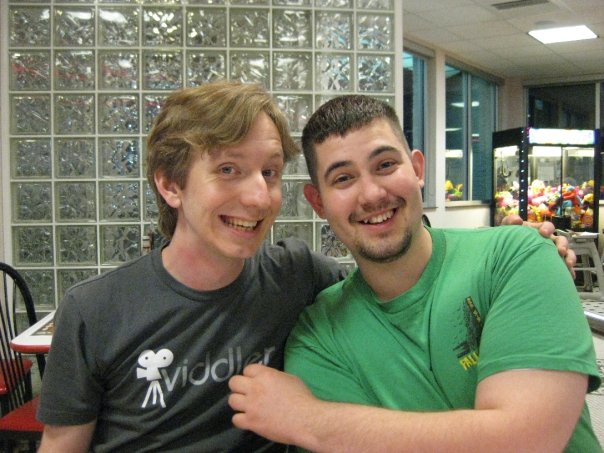
Throwback to 2009 at Steak 'n Shake with Kraz. Miss this guy. And Steak 'n Shake.
Original photo by Jon Krasnichan
Want to read: Exvangelical and Beyond: How American Christianity Went Radical and the Movement That's Fighting Back by (ISBN 9780593717073)
Want to read: The Kingdom, the Power, and the Glory: American Evangelicals in an Age of Extremism by (ISBN 9780063226883)
Bookmarked: Good, Standard Work: Creating the Commons
Free idea for your website: Donnie Darkmode. Like regular dark mode, but it also adds an image of a man in a rabbit costume somewhere on the page.
I ran into this odd issue when trying to add two Yubico security keys to my Google account on a Windows machine. The process on myaccount.google.com keeps prompting to “Enroll Windows Hello” in order to create passkeys.
If you want to skip the preamble, jump directly to the steps.
Whenever I clicked the “Create a passkey” button in the middle of that page, it opened the special link ms-settings:signinoptions, which opens the Windows OS settings page for sign-in options. My best guess is that Google wants the machine itself to use one of those options, but I prefer not to at this point.

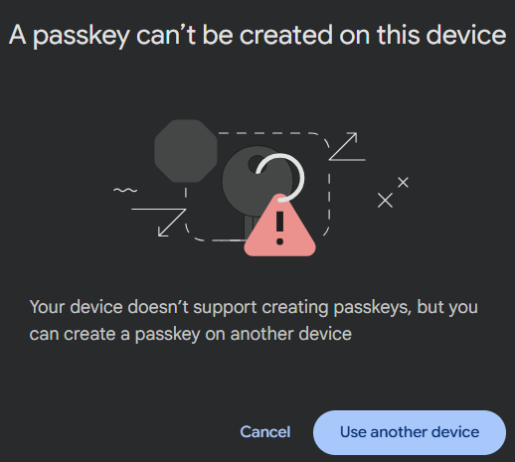
I did some clicking around between the security page, two factor authentication page, and the passkeys page, both with the security key plugged in and without. I don’t remember the exact steps, but I did eventually get to the “Use another device” prompt and was able to set up the passkey on the security key. At that point, I had my first security key and my phone listed as passkeys. I wanted to add my second security key (backups!), but no matter how I tried, I could not get back to that “Use another device” prompt.
I turned to the human internet and found some threads on Reddit. This one in particular had a comment suggesting signing up for Google’s Advanced Protection Program. It is free, so it was possible, but I persisted on mostly in spite because this shouldn’t be so hard!
Fast forward through several more clicking around adventures and here is how I got it to work:
- Visit https://myaccount.google.com/advanced-protection/onboarding and sign in
- Scroll down and expand the section “Passkeys and security keys”
- Select “Create passkey”
- In the popover, select “Use another device” (screenshot below)
- Another popover with a QR code instructs to scan with a phone or tablet. Ignore that prompt and click the “Back” button at the lower left of the popover
- The QR popover will go away and you should see the prompt “Choose where to save your passkey for google.com”. Select “Use an external security key” (screenshot below)
- From that point, follow the OS prompts to enter a PIN and touch the security key
- Done! The security key now shows up in the list of passkeys

Reposted Al Abut:
— Al Abut, https://techhub.social/@alabut/116342787994876100“Movie nerds! Come hang out at our #indieweb zoom on Saturday April 11th to talk about surfing and aliens:”
https://events.indieweb.org/2026/04/march-april-movie-club-h6pXaMEkEjj1
I am trying out a method to reduce bot attempts on forms like on my contact page based on fluffy’s example.
On select pages, I now check for a specific cookie. If it is not found or is more than 24 hours old, then the browser redirects to the “Sentience Check” page. That page is a minimal form with a button to indicate “Yes, I am a hooman.” Submitting the form sets the expected cookie and redirects back to the original page. If Javascript is enabled, it will submit the form as soon as the page loads, so most hooman visitors will only see the intermediate page for a second and should be able to continue without issues.
Also at fluffy’s suggestion, the sentience check page returns a response code of 429: Too Many Requests with a header that indicates: retry after one hour. I have no high expectation of the bots respecting that, but maybe the lack of successful response codes will cause some to back off.
The last thing I did was add a noindex meta tag on the page, so search engines should ignore it.
If you’d like to view the page, I recommend turning Javascript off temporarily and then visiting: gregorlove.com/sentience-check/.
I am interested to see how much this will reduce bot attempts on the contact and public sign-in pages. I have had CSRF and honeypot form field protections on both for quite a while, but of course I still see a lot of attempts on them.
Depending how this goes, I might expand its usage to the “send a webmention” form and explore using it to block LLM bots.
I did consider using “I am a meat popsicle” on the button, but not everyone might get The Fifth Element reference.
If it's a required question without a "I do not wish to answer," that's unlawful.
It could potentially be they're trying to be more inclusive for equal opportunity reasons, but they should communicate clearly that the question is optional.
I added a banner to go along with my Long Covid Awareness Day post.

“International Long Covid Awareness Color Codes: Teal:
https://www.longcovidawareness.life/graphics#18929A, Grey:#939393, and Black:#000000”
Aside: I quite like this teal color. I might have to work that into my site in some places in the longer term.
I really enjoyed watching Winged Migration (2001). Some breathtaking footage of bird migrations all around the world. I was shocked how close some of the footage was and learned via Wikipedia that the filmmakers raised several species from birth so they would imprint on the staff and be accustomed to the ultralights and camera equipment.
Thanks to Fractal Kitty for the recommendation for IndieWeb Movie Club!

I ordered a dirty chai and I complimented the barista on his handwriting as he wrote out this “Chai.” As he drew the “X”, he explained he used to write “Chai XXX” since, ya know, dirty chai. Then he figured, “Why not Chai XCX?”. Much appreciated handwriting and wordplay.
A San Diego mutual aid organizer I’m connected with needs some urgent jaw surgery and treatment after the last surgery didn’t go so well. gofund.me/3fa8dcf45
Any amount helps and boosting is much appreciated. 💛
Sometimes the difference between critic and listener reviews for music is wild. I’m trying to listen to A Grand Don’t Come for Free from the 1001 Albums project. It apparently has a 91/100 on Metacritic, but a slew of 1-star listener ratings. I’m definitely leaning towards the 1-star crowd.